

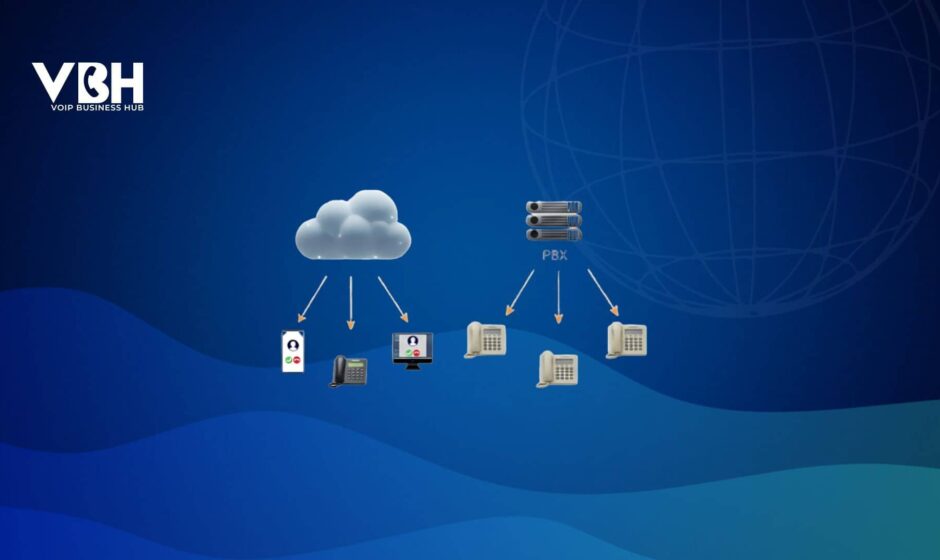

Both Hosted PBX and Cloud PBX are modern alternatives to traditional on-premises phone systems. In essence, a PBX (Private Branch Exchange) is the private telephone network within an organization. Moving it off-site means business communications become more flexible and cost-efficient, with calls routed over the internet via a remote PBX service (run by the provider).
Sometimes it’s easy to mix up the terms, as they both refer to handling PBXs, and they are indeed very similar. The main distinctions to note are where the platform runs, how calls travel, and how the service scales and integrates, plus differences in pricing, security, and compliance.
Let’s explore the unique differences between a Cloud and a hosted PBX in this blog.
Key Differences Between Hosted PBX & Cloud PBX
Hosted PBX is essentially your own business phone system hosted by a provider, whereas Cloud PBX is a scalable communications platform delivered as SaaS.
1. Infrastructure Location & Hardware Required
The core difference between hosted PBX and cloud PBX is where the call control lives and how the underlying infrastructure is built.
Hosted PBX
Technically, your phone system runs as a dedicated virtual PBX in your provider’s data center. Think of it as “your own PBX, just not in your building.”
In practice, you still rely on the same on-site components: IP phones or softphones, PoE switches, and a business-grade router/firewall with a solid internet connection.
Cloud PBX
Call control and routing run on a multi-tenant, cloud-native platform that spans across a shared environment or multiple regions. There’s no single server that “is your PBX” as the platform allocates resources to you on demand.
On-site, the footprint looks similar: IP phones or softphones, PoE switches, and WiFi. The difference is that capacity and redundancy live in the cloud fabric rather than in a fixed PBX.
Survivability and Failover
In hosted PBX setups, if your office goes offline for some reason, the provider can automatically send calls to voicemail or to backup phone numbers so you don’t miss them.
In cloud PBX, failover is usually built in, with automatic re-registration to alternate data centers & rules like: if the desk phone is unreachable, ring the mobile app or activate call forwarding.
Legacy and edge devices
Both hosted and cloud PBX can support analog or specialty devices (fax, alarms, lift phones, door intercoms, overhead paging) via analog telephone adapters (ATAs) or gateways.
Thus, hosted PBX feels like renting a traditional PBX in someone else’s rack. In contrast, cloud PBX feels like consuming a pure SaaS communications platform with fewer attachments.
2. Scalability and Flexibility
Hosted PBX is typically more suitable when your business growth or expansion is predictable, because capacity is pre-sized for an expected number of users and calls. Cloud PBX, by contrast, is built to scale on demand at the platform level.
Hosted PBX
A hosted PBX at your provider’s end:
- is provisioned with a fixed number of SIP trunks, CPU, RAM, and storage.
- The PBX software has license limits for registered endpoints, queues, and features.
When you want more sites, more agents, and more concurrent calls, the provider must:
- increase trunks and licenses for your particular PBX server, or
- migrate you to a larger VM (virtual machine).
Burst capacity is limited by the PBX’s available headroom. For example, if you suddenly double the call volume, you might hit call admission limits or see degraded telephony performance.
Cloud PBX
With a cloud PBX, scalability is handled at the platform level:
- There’s no fixed box, and capacity is drawn from a pooled cloud telephony platform, so you are constrained mainly by your “plan” and the provider’s overall limit, not by a server.
- New users, numbers, or call queues can be added through an admin portal, and IP phones can be auto-provisioned with role-based control and features.
Overall, hosted PBX typically receives updates during scheduled maintenance cycles, but cloud PBX pushes new features continuously without requiring downtime.
3. Features & Integrations
Both hosted and cloud PBX meet your business’s telephony needs. The table below suggests where each one is stronger, more native, or more limited across different dimensions.
| Feature | Hosted PBX | Cloud PBX |
|---|---|---|
| What do you get? | Classic PBX + some UC features. | Usually full UCaaS (voice, video, chat). |
| Auto-attendant & IVR | PBX-style menus and call flows. | Standard IVR. Depth varies by plan. |
| Call recording & voicemail | Recording, voicemail-to-email, & visual voicemail. | Recording + voicemail-to-email; AI transcription common. |
| Queues, ring groups & conferencing | Yes, but screen sharing is often via a separate tool. | Yes. Built-in video conferencing and screen sharing. |
| Mobile & softphones | Softphone and mobile apps. Usually includes a desk phone. | Softphone apps for mobile/web (WebRTC) with UC-first features. |
| Team chat & messaging | Often present but PBX-centric; varies by vendor. | WFM/CRM/CPaaS-like channels and DMs. |
| Workflow automation | SIP hooks, REST APIs, custom/MSP-built connectors. | Native webhooks; many prebuilt automations via apps/flows. |
| CRM & other integrations | Available with some custom work. | Native CRM apps (click-to-dial, auto logging, presence sync). |
| App ecosystem & APIs | Smaller ecosystem; limited ready-made apps. | Large marketplace; broad public APIs. |
| Contact centre / CCaaS | Possible via CTI per deployment. | Certified CCaaS integrations; optional native CCaaS modules. |
| Supervisor tools & analytics | Basic monitoring, barge/whisper, standard reports. | Dashboards, analytics, reporting + AI insights (transcripts, sentiment, QA). |
| Omnichannel & AI assistants | Mostly voice-focused; SMS/chat/bots often separate or custom. | Voice, SMS, chat, email + AI assistants in one interface. |
Hosted PBX is ideal if you need customization, rigorous compliance, or deep integration with legacy enterprise tools. Cloud PBX shines if you want modern features fast and prefer industry-grade tools integration over custom development.
4. Call Flow & Media Path
How your calls travel between your users, the PBX, and the outside world directly impacts latency, voice clarity, and your network design.
Hosted PBX
A hosted PBX call typically looks like this:
- The IP phone or softphone sends SIP signalling over your LAN to your router.
- The call is sent over the internet (or a private IP link) to your provider’s hosted PBX.
- The PBX instance decides what to do:
- route the call to another extension registered on the same instance, or
- send it out to the PSTN via the provider’s SIP trunks.
- RTP media usually flow in the same way: from your endpoint, through your WAN link, into the provider’s PBX/media gateway, and then out to the callee’s side.
Because most calls are routed through a small number of provider data centers, hosted PBX works best when a large proportion of your staff sits in a few central offices. For global teams or heavy remote work, voice traffic may have to travel further, which can increase latency and put more load on your network and QoS design.
Cloud PBX
Cloud PBX changes where signalling and media are handled:
- The IP phone/softphone still sends SIP signalling over your LAN to your router.
- Instead of a single PBX, the call is routed to the provider’s nearest cloud edge/server.
- The platform routes the call using shared services:
- to another user on the platform (possibly anchored at a nearer edge), or
- out to the PSTN via distributed SIP gateways in the cloud.
- RTP media can be anchored at different cloud data centers based on the caller and callee’s location, so that the path can be shorter and more optimized.
With Cloud PBX, calls usually enter the provider’s network closer to where users and customers are, so remote staff and branch offices often hear better, more consistent call quality. IT teams can rely more on standard internet rather than building a network around a single PBX.
5. Security, Compliance & Data Residence
Both models protect and store call data, helping you meet regulatory requirements. What differs is how they structure security, handle data residency, and build resilience into the platform.
Hosted PBX
With a hosted PBX:
- Your call detail records (CDRs), voicemails, and recordings typically live in one or a small number of data centres chosen by the provider.
- Reputable hosted PBX providers support SIP over TLS and SRTP for signalling and media between your site and their platform.
- In practice, you rely on the provider to enforce best practices (patching, cert rotation, key management) within a clearly maintained PBX system.
- Separately hosted environments are more regulated for compliance. One customer per PBX instance, clear logs, and access controls. But how far this goes (SOC 2, ISO 27001, HIPAA, PCI, etc.) depends heavily on the individual provider.
Cloud PBX
Cloud PBX runs on a distributed cloud infrastructure:
- Instead of isolating you on a dedicated PBX VM, cloud PBX platforms enforce strong logical separation between tenants at the application and data layers. Role-based access control, per-tenant keys, and granular permissions are standard.
- Media signalling is the same as hosted PBXs. However, cloud providers usually automate much more of the security, such as patch pipelines, certificate management, DDoS protection, and anomaly detection.
- By default, a cloud PBX may replicate data across zones. Many platforms also offer region pinning or data residency controls.
- Larger cloud PBX/UCaaS vendors typically have more certifications (SOC 2, ISO 27001, HIPAA, GDPR tooling, etc.) and provide detailed documentation and audit logs.
Hosted PBX suits buyers who want a bounded environment with per-instance logs, whereas cloud PBX suits teams aligning with a broader cloud security strategy.
6. Pricing & Total Cost of Ownership
Both replace big upfront PBX purchases with ongoing service fees. The differences show up in how you are billed and how costs scale based on what you use.
Hosted PBX
Most hosted PBX offers are sold at a fixed price per user or per line, often on a contract basis. Plans may include local and/or national minutes, then charge extra for international calling, toll-free numbers, or call center features (call analytics, AI, and deep integrations).
Cloud PBX
Many cloud PBX platforms offer per-user subscriptions but also support usage-based or flexible licensing terms, so you pay for what you use. Voice, video, chat, and basic integrations are often included, while advanced analytics, AI, or CCaaS may be add-ons.
Cloud vs Hosted PBX – Which One Should You Choose?
Hosted PBX suits stable, compliance-heavy teams that value control. Cloud PBX suits agile, distributed companies that prioritize speed and ease of control.
| Hosted PBX | Cloud PBX | |
|---|---|---|
| Architecture & control | You want a single-tenant PBX. | You prefer a multi-tenant, cloud platform. |
| Scale & change | Growth is steady, and upgrades can be planned. | Users, queues, and sites change often and need elastic capacity. |
| Network shape | Most traffic comes from a few main offices on a hubbed WAN. | Users and callers are spread across branches, home offices, and regions. |
| UC & integrations | You need solid telephony with selected UC/integration add-ons. | You want full UCaaS, app marketplace, and deep CRM/helpdesk ties. |
| Compliance stance | You favour per-instance PBX boundaries and scoped logs. | You lean on big-vendor cloud certs, region options, and platform logs. |
| Operating model | Change via IT tickets and maintenance windows is acceptable. | Admins expect self-service changes in an admin portal in near real time. |
Stop Choosing by Trend. Start Choosing by Reality.
Hosted PBX tends to fit organizations with highly regulated offices, predictable scaling, strict per-instance compliance needs, and a strong dependency on legacy devices or custom setups.
Cloud PBX is usually a better match for teams that are distributed or rapidly growing, want UCaaS and integrations to move quickly, and are comfortable aligning with a broader cloud security and operations model.